A memory that lasts. The same work for far fewer tokens.
The first part of 0.2.0: long conversations fold in place instead of starting over, Mars remembers a project from one session to the next, and runs keep going through provider trouble. The rest of 0.2.0 follows in later builds.
Conversations that fold in place
When a session grows long, its older part folds into an epoch: an outline of what was read, changed and run, and a short summary checked against it. The conversation carries on in the same session, your instructions and decisions are kept word for word, and /compact folds in place.
A memory across sessions
Your instructions, decisions and what happened when are kept in a journal in your profile on this computer, never in the repository. A decision from an earlier session comes back as a short hint when it matters, and the agent can look up a day, a file or a topic in one call.
Memory you can see
A Memory view shows the journal by day. Pin, archive, edit or forget a record, keep an instruction for the whole project, and export or import memory from Settings. Context books and Memory.md from earlier versions are carried over unchanged.
Far fewer tokens
Each request carries the everyday tools and loads the rest when needed, the system prompt stays the same through a run so the provider’s cache keeps working, checks are sized to the change, and tool results stop repeating what the agent already sees.
Runs that keep going
A failure, a busy queue or a rate limit is waited out with a countdown, a request held in a provider’s queue is waited for instead of sent again, and a fallback chain of models continues the conversation on the next one when a model gives out.
Steadier plans and goals
The context estimate follows what the provider reports, so compaction comes later. Plans, goals and reviews keep their state at the end of each request, so the cache holds through a long goal, and a goal can read the project before its checklist.
Updates chosen by the release
The version Mars should run is chosen by the release catalogue, not by the larger number: a fixed build under the same version or a step back arrives as an update. Every update is still signed for its exact version.
Talk while it works. Every model as its provider describes it.
What you write while the agent works reaches it at once, approving a tool takes one quiet line, and every model, limit and reasoning level now comes from the provider itself. Everything since 0.1.9 is in this release.
Guidance that lands now
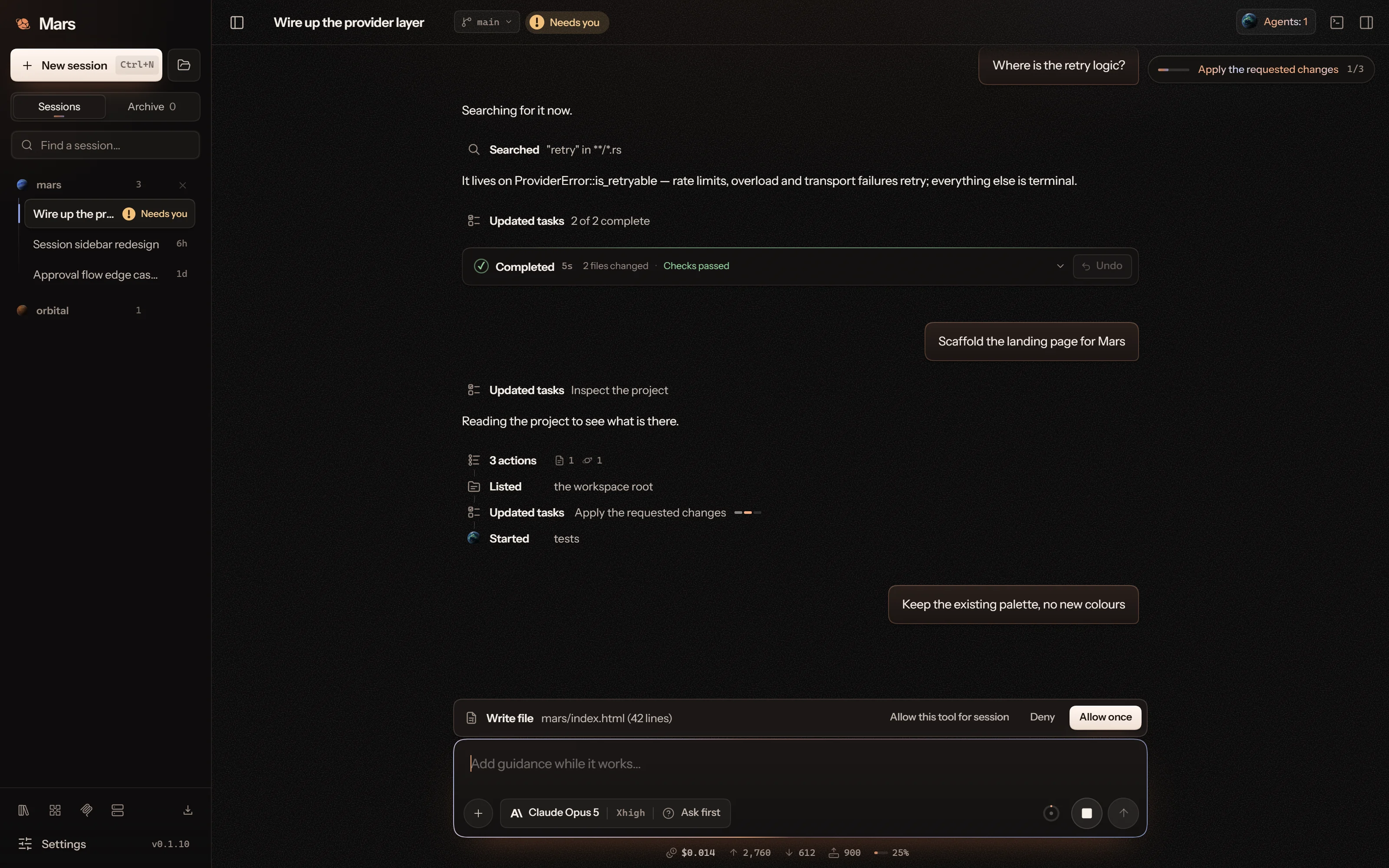
Send a message while the agent works and it goes to the run at once, shown as sent under the step in hand. The agent reads it at its next step, and the message stays exactly there when the session reloads.
Your side, on the right
Your messages sit on the right and the agent’s work on the left, so what you asked never blends into what it did.
Approvals in one line
The action and what it acts on, with Allow once, the session allowance and Deny at the end of the line, just above the composer. The exact command sits beneath; the arguments wait behind a fold.
Models from their providers
The models a connection offers, their limits, reasoning levels, image support and the protocol each one runs on come from the provider’s own catalogue and from Models.dev, not from a list inside Mars. New models appear without an update, and a model that cannot be described is not offered.
Reasoning that fits the model
The picker offers the levels a model accepts. A level it lacks maps to the nearest one, a tie to the cheaper, and thinking models get their own reasoning back between tool calls, so a turn keeps its thread.
The provider’s own words
A refused request shows the provider’s explanation, such as a setting your account needs. A spent plan stops at once; a passing limit or a server failure is retried and reads as a busy model.
Ten more providers
Each with its own logo, and the model picker keeps a host’s models under the connection they come through.
Status you can trust
Needs you clears when the work is over, an agent’s last state comes from its run’s receipt, and the Thinking clock stays beside its word. The lines that mark what is current are a third softer.
Updates that install
An update from the Night theme installs instead of stopping at the installer’s colour check. Coming from 0.1.9 or 0.1.10, turn on Settings → Accessibility → Stronger contrast for the update, or install the download from this site over the existing app. Your sessions and settings stay.
The desktop is rebuilt in the style of this site: warm black, clay light and the blue of a Martian dusk. Plans and reviews arrive as cards you decide on, the agent judges what each call would do, and what a session spends sits under the composer.
Night on Mars
Glass panes, clay ink and a dusk line that marks what is current. Every tool has its own drawn glyph, live work reads as one line with the step under way, replies arrive word by word, and focus looks the same on every control.
Plans you can read whole
A plan arrives as a card with numbered steps, the files each one touches and how it will be checked, and is saved as a document in your project’s .mars/plans that opens in the editor: what the agent found, the approach and the change in each file. Proceed, run it as a goal, revise it or deny it.
Reviews with the code in view
Findings are ranked by severity. Each one opens on the lines it is about, with the problem, its consequence and the direction of a fix, which you can send to the agent one at a time or all together.
Auto access
Every tool is offered and each call is judged by what it would do. Routine work runs at once; a risky call asks and says why, and allowing it for the session covers only that kind of call. Plan and review stay read-only.
What a session spends
One compact line under the composer shows the cost in dollars, tokens in and out, cache reads and writes, and the speed of the reply. It opens on a breakdown for every run.
Notifications that say what happened
Windows notifications name the session and quote what matters: the start of a reply, a question, the call waiting for approval, an error, a plan ready for your decision, a review or a goal. The taskbar button lights while something waits.
A workspace in tabs
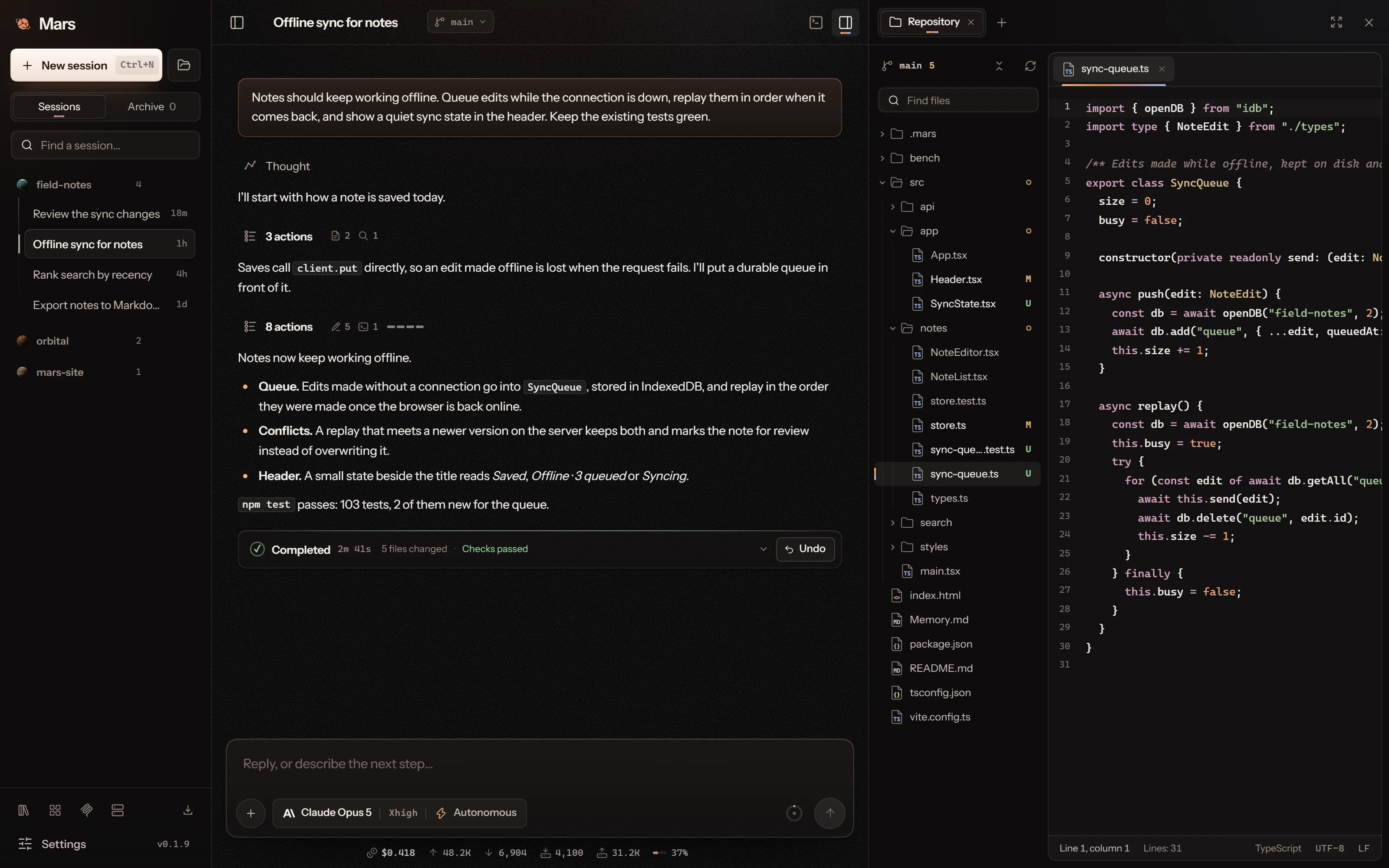
Repository, Git with pull requests, Agents and Browser open as tabs from a launcher. The file tree shows file types, nesting and Git state, and agents gather on an orbit map around the lead.
Updates you will notice
A new version takes its own row in the sidebar. The update window shows the version you move to, its notes, the signature check and every step from download to restart.
Mars in your language. An agent that finishes the job.
The interface is available in 23 languages, the agent checks its own work before it reports done, and a repository audit fixed 57 confirmed defects.
23 interface languages
Choose a language in Settings or the title bar, where each one is listed by its own name. Switching applies at once and keeps your draft, open session and editor as they were. Notifications and the Windows installation, update and repair windows follow the same choice. Existing installs stay in English until you pick a language; the agent's response language remains a separate setting.
A higher bar for the agent
The built-in working instructions set a clear order of priorities and a finish loop: use the result as its user would, fix what turns up, check again and run the tests before reporting done. A partial result is no longer called finished, and you can still ask for a lighter approach.
Safer agent tools
A file is reread in a new run instead of reusing a stale copy that could overwrite your edits. Remote commands cannot turn into local ssh options, web fetches refuse addresses that lead onto the local network, edits keep the line endings of untouched lines, and child processes find gh, global npm and pip installs.
Sturdier sessions
Renaming a session in another window no longer breaks its save, undo honours nested .gitignore files, one damaged record no longer blocks a workspace, and an approved action shows as running with its live output.
Improved context compaction and session feedback, with refreshed Windows installation, update and repair windows.
More reliable compaction
Context summaries use bounded budgets and retain durable facts and history. Optional compaction can defer when the original request still fits.
Session feedback
Compact token, cache and cost information sits below the composer. System notifications can report completion, requests for input and interruptions.
Windows setup
Installation, updates and repair share the Mars logo, inherited appearance, readable progress details and reduced-motion support.
Release availability
This release uses the English interface; interface language selection is temporarily hidden while translations are completed. Downloads are limited to Windows Desktop, with CLI downloads paused. Unfinished media and interactive rendering work is deferred to 0.1.8.
The desktop brings file changes, Git comparisons and session activity into a consistent interface, with less repeated text and more useful detail where you need it.
One language for files
Changed files, run receipts, Git, plans and the composer share file rows, language marks and change counts. Search fields, loading indicators and typography follow the same system throughout the workspace.
See exactly what changed
Tool details and Git comparisons highlight changes within each line. File comparison cards retain syntax colours and line numbers, while the Git pane adds clearer sync counts, grouped changes and history navigation.
Read session activity at a glance
The sidebar and session header distinguish work, context compaction, requests for your input and failures. Run receipts, tool rows, task details and message actions have been refreshed together.
A quieter editor
The repository tree, editor tabs and recent files show useful change and unsaved state. Floating editor controls and fewer duplicated labels leave more room for the work itself.
Agents discover their available workflows at each run’s start and receive a before-delivery review reminder after source edits. Browser checks can run in the background while you keep working.
Discovery before work
Mars performs bounded reads of enabled skills and connected plugins before the first model request. Revision 4 requires agents to read relevant workflows fully and recover missing instructions selectively after compaction.
A browser that stays in the background
Navigation, actual input and browser-only captures work with the workspace closed or the window minimized. Automated checks no longer open the browser panel or restore the application.
Read the page console
The separate browser_console tool reads bounded warnings, errors, uncaught exceptions and browser/network diagnostics. Web-product checks require log review together with rendered screens and interactions.
Review before delivery
After source changes, the runtime reminds the agent to inspect applicable structured checks and interface evidence. New edits invalidate earlier evidence; missing checks remain visible. This improves the completion process without claiming that a model’s judgment is infallible.
A later, clearer context threshold
Automatic compaction normally targets about 85% of the full input window. The context meter shows the effective threshold, including overhead and space reserved for the answer. Larger explicit answer budgets can require earlier compaction.
Project checks now have a shared plan, a bounded run and a report you can inspect. The workspace gives clearer feedback while agents work and retains useful context when a session grows.
Project checks in one place
Agents can plan checks, start a job, wait for its report and cancel it. Profiles cover formatting, lint, types, tests, builds and configured coverage, security and browser flows. Available checks depend on the project’s local tools and configuration; missing checks remain visible.
Results you can inspect
The desktop shows plans, running jobs, results, expandable diagnostics and saved logs. Each check action has its own SVG icon. An unfinished job or unavailable check stays distinct from a pass.
Bounded mutation testing
A separate profile runs baseline tests, then tries a limited set of boolean and equality changes in a private copy of Rust, JavaScript or TypeScript sources. Reports distinguish caught defects, surviving changes, timeouts and invalid variants. JSX and TSX are outside this first adapter.
A more responsive workspace
Loading indicators and active tool icons animate while work runs and settle when it finishes. Menus stay inside the window, show the selected option clearly and support keyboard navigation. The welcome screen keeps its opening action centered instead of sinking to the bottom. Reduced-motion preferences remain respected.
Keep useful context
Compaction retains the current skill and plugin catalogue plus references to successfully read instructions. Agents recover missing pages as needed. Compact tool schemas and saved report artifacts keep routine evidence from crowding the conversation.
Verify before handing over
Signed instruction revision 3 strengthens regression checks, proportionate mutation testing and critical visual inspection. The runtime brings outstanding check results back to the agent before an ordinary final response. Accepted guidance is preserved if a request fails or is cancelled.
Transport security fixes
Updated the Rust TLS and QUIC dependencies to rustls 0.23.46 and quinn-proto 0.11.18, which include the current RustSec fixes.
Windows update delivery
Fixed in-app downloads for existing Windows installations. The download service serves the installer directly so installed clients can update to 0.1.4.
Multi-file actions, Git workspace controls and a quieter update centre. Desktop and CLI share the same tools and agent instructions.
Multiple files, one tool call
Agents can use multi-read, multi-write, multi-edit and multi-delete. Results stay separate for each file, with bounded reads, reservation checks and live progress. Partial success and cancellation preserve the evidence of completed changes.
Git inside your workspace
Browse and create branches, compare changes against a selected branch, stage files, commit and synchronize safely. Use your connected GitHub plugin to browse accessible repositories, clone into a new folder and work with pull requests.
A calmer update centre
Available updates and installed extensions have separate views, with details on demand. Downloads show their speed and can be cancelled before installation. Publisher signatures are verified before Mars asks to stop active work.
Safer interrupted work
Durable file and checkpoint publication preserves completed changes. Recovery retains context-book and artifact evidence after uncertain saves, and recognizes owned temporary files when removing a session.
Guide a running agent
Send another message while the current action finishes. Live guidance is accepted at the next safe boundary; a closing run retains the message for the next launch.
Clearer model prices
The selector distinguishes provider catalog rates from Mars credits and unknown prices. Small positive rates retain their precision; catalog prices are not presented as actual account charges.
Read, apply, verify
Instruction revision 2 asks agents to apply selected workflows and critically check rendered interfaces, fix defects and repeat affected visual checks. The new Repository Audit skill adds a focused workflow for comprehensive reviews alongside Change Review.
Fresh Desktop and CLI builds with the same agent core, a calmer terminal and clearer extension setup. Install this rebuilt 0.1.2 once from Downloads to enable the new updater and signed instructions; same-version rebuilds are not offered as automatic upgrades.
Media in your draft
Attach screenshots, MP4 video and WAV or MP3 audio together. Preview before sending; format, duration, size and model-support checks keep unsupported inputs out of a request. Up to four media files per message.
Choose models more comfortably
Model and reasoning controls are separate. Search the catalogue, filter free routes, order by input price or context, and inspect the reported limits and prices on hover. Reasoning choices follow each model’s API metadata.
Updates in one place
The sidebar shows your installed version and opens a shared update centre. It checks release, instruction and installed-package metadata every 15 seconds, with network backoff when needed. The installer’s Mars publisher signature is verified before launch; active work requires confirmation before a restart.
Instructions that can stay current
Mars verifies signed behaviour profiles and applies them at the next start, across Desktop, CLI and SSH sessions. Running agents retain their instructions. Offline startup uses verified local data or the bundled defaults.
Focused capability discovery
Each new task starts with a review of available skill and plugin metadata, reusing an unchanged catalogue. Agents load selected workflows or exact action schemas; multiple skill documents can be read in one bounded call. Helper roles remain present after compaction.
Check the rendered result
The desktop browser adds hover, keyboard input, viewport controls, bounded waits and console diagnostics. Capture a labelled sequence of actual frames to inspect animations. Models without image support receive text and file references.
Clearer extensions and terminal work
Connectors show Manual or Auto with setup steps; this build uses Manual token connections. The CLI keeps folded reasoning, readable actions, a controllable session sidebar, settings and extension management backed by the shared core.
Clearer agent activity and file-change receipts, with owner-approved access to reserved paths.
Consistent appearance
Agent controls, graphs and detail panels follow the selected theme, with clearer hover states and compact layouts.
Readable agent history
Follow individual actions with their operation and file path, then expand the evidence. The full assignment stays in Task & details. Fold earlier activity and review history without being pulled back to the live stream.
Changes from this run
The composer shows confirmed file and line-change counts for the current run. Browse a scrollable file list and open individual diffs.
Owner-approved edits
Request a file or folder loan from its owner, or an exact patch pinned to the file’s revision. The owner grants the scope before a borrower can edit it; changed revisions require a new patch request.
A workspace for following a team’s progress, tracing its messages and reading the context it keeps along the way.
A workspace for agent teams
Follow supervisors and nested helpers in a movable graph, with distinct running, completed and stopped states. Inspect thinking, tool calls and responses in a resizable detail panel. Expand to the full window while keeping your selection and drafts.
Messages you can trace
Host routers connect teams and show delivered messages on the graph. Search the current run’s router journal, filter by sender or recipient, and open the full message or its agent task. Routing itself makes no model request.
Workflows with room to grow
/workflow N <task> selects a cumulative budget of 10–100 helpers. Each owner’s team has its own concurrency limit. Waiting supervisors release their execution slot, and stopping an agent cancels its subtree.
Context books
Compaction saves detailed chapters with recorded dates, models and source excerpts. Agents can retrieve scoped passages when needed. Browse the human viewer by UTC date or model, move branches and read saved chapters in a paged reader.
Revised Skills by Mars
All 35 authored workflows have been revised, with focused references loaded only when needed. Active skill discovery respects the tools exposed to the current run. The catalogue also retains 101 verified community skills.
Service sign-in
Use token forms to connect service accounts in this release. Browser sign-in for GitHub, GitLab.com, Linear, DigitalOcean and Hugging Face is supported in builds configured with registered OAuth clients.
Explore it before installing
The website now has an English interactive simulation, new interface screenshots and these release notes. The 80-helper demonstration uses production components with local fixture data. Pause, restart and explore without a provider account.
Grouped navigation and project rows, with a saved width adjustable by dragging or keyboard. The inspector preserves conversation space and becomes an overlay at smaller sizes.
Skills and collections
Readable rows, author identities and filters for collection, author and installed or active state. Preview a pack, select its members and install the selection in one transaction. Disabling a skill keeps its downloaded files.
Service capabilities
Twenty service connectors expose 122 actions. Railway adds domain and service management plus documented API access. Connection scopes and write approvals remain in place.
Interface and packaging
Custom Skills menus and disclosure and switch motion respect reduced-motion settings. Windows packaging consistently resolves its target directory; the source-map-js build dependency was updated.
0.0.12
Skills, plugins and your own integrations.
A new Skills catalogue
Thirty-five Skills by Mars and 101 pinned community packages. Browse GitHub sources, preview instructions and install or remove a package. Agents use scoped catalogue and instruction tools.
Plugins
Twenty service connectors with account verification and read/write actions shared by Desktop and CLI. The Plugin Authoring skill creates workspace packages for a separate Local catalogue.
Reviewed connections
Local connections are bound to the reviewed package. Changed packages and replaced accounts require fresh access, and credentials stay in the operating system’s credential store.
Shared library changes
Skill package and preference changes are atomic between clients, with rollback when saving fails and clear warnings if cleanup cannot finish.
Earlier releases.
0.0.9Settings, memory and local usage
A clearer Windows installation path, condensed remote session details and multi-session selection.
Focused settings with 30 interface themes and typography, code, terminal, layout, motion and contrast controls.
A project memory panel for reviewing and safely editing Memory.md, with linked sessions and unsaved-change protection.
Local usage charts, project and session rankings, model details and explicit data coverage.
0.0.8Built-in browser and capture
A live browser workspace with navigation, agent inspection, interaction and screenshots.
Desktop and browser capture with region and elliptical crops plus local Windows text recognition.
Optional, individually closable workspace tabs, clearer file diffs and full patches.
Session multi-selection with batch archive, restore and confirmed deletion.
0.0.7Conversation and approval controls
More compact run, context, approval, model, environment and agent controls.
Improved new-session layouts and model picker empty states across appearance modes.
Autonomous permissions allow routine workspace edits and recognised project checks while reviewing protected paths, deletion, network access and uncertain commands.
0.0.6The paper workspace
A desktop redesign in paper, graphite and oxide, with quieter controls and motion.
Conversation-first sessions and a workspace drawer in narrower windows.
A saved token limit for Goal mode, even when provider setup fails.
Clearer session grants, direct run-receipt diffs and a single MCP add action.
The browser preview filters models by connected provider and responds to Stop.
0.0.5Permissions and reliability
Approval cards show SSH details and full tool arguments; concrete file paths and bodies retain preflight review.
Safer Git boundaries, redirected web fetches, SSH probes and profile handling.
Paused plans stay paused after a chat message; deleting a running goal records cancellation.
Improved gateway stream idle handling and provider billing-error presentation.
Disabled SSH servers cannot be selected; directory listings retain up to 4,000 entries.
0.0.1Unpublished beta candidate
A standalone terminal workspace with mouse navigation, session history, settings and provider-grouped model selection.
Shared local Desktop and CLI sessions, progress and settings, with history migration and conflict detection.
Saved Plan decisions and durable Goal checklists with pause, resume and final verification.
Readable Markdown, code, line-numbered diffs, tool output, run receipts and context status.
Independent terminal shell processes, delegated-agent output, session archive and restore, and a searchable keyboard catalogue.
Version and freshness checks, packaged documentation and source and binary fingerprints. Candidate status did not mean all release checks had passed.